In short
ChatGPT recommends businesses it can find checkable facts about in several places: on their website (services, prices, city, how to book), in their Google Maps and Bing Places profiles, and in reviews. Nobody can guarantee a place in the answer, but the 7 steps below clearly improve the odds.
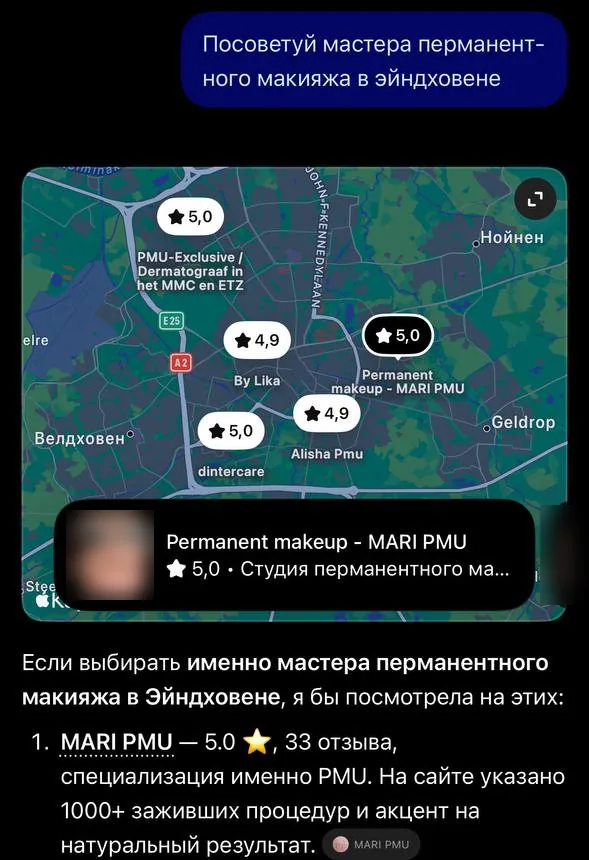
«Recommend a permanent make-up artist in Eindhoven»
MARI PMU — 5.0, 33 reviews, specialising in PMU. Her website mentions 1000+ healed procedures and a focus on natural results.
ChatGPT’s answer in Russian, October 2026, translated. The rating comes from Maps; the 1000+ procedures come from her website.
Where ChatGPT gets its answer
When a client asks “recommend a dentist in Berlin”, ChatGPT searches the web: through search engines (including Bing) and its own search bot, OAI-SearchBot. It reads the websites, maps and reviews it finds and turns them into a short list with explanations.
The businesses that make the answer are the ones with clear facts. ChatGPT takes ratings and reviews from maps, and the specifics — prices, services, experience, area — from websites. With no website, or an empty one, all that’s left is a map listing, and you are one of many.
01 / 07
Step 1. A website with the facts written as text
AI quotes facts, not fine words. Your website should say these plainly, as text, not in images or PDFs:
- what you do and for whom: “dentistry for adults and children”, “mobile sofa cleaning”;
- prices, or at least “from”: “hygiene from €60”, “villa from €180 a night”;
- the city and area you work in or travel to;
- opening hours, languages and how to book or get in touch;
- checkable facts about you: years in business, number of clients or procedures, certificates.
CheckOpen your website on your phone. Can you see the service, a price, the city and a booking button without scrolling?
02 / 07
Step 2. A website open to search bots
Many websites block bots by accident: through hosting or site-builder settings, or Cloudflare protection. Then ChatGPT, Perplexity or Copilot simply can’t read the page.
Bots you shouldn’t block: OAI-SearchBot and ChatGPT-User (ChatGPT), Googlebot (Google and Gemini), Bingbot (Bing and Copilot), PerplexityBot, ClaudeBot. GPTBot is what OpenAI uses to train its models; you can block it without affecting ChatGPT search.
CheckOpen your-site/robots.txt. If it says “Disallow: /” for these bots or for all of them (“User-agent: *”), your website is closed to them.
03 / 07
Step 3. Map profiles with the same details
Create or check your profiles on Google Maps, Bing Places and Apple Business Connect. Name, address or area, phone, hours and the website link should match your website word for word.
Bing Places matters in particular: many AI assistants, ChatGPT and Copilot included, rely on Bing’s data.
04 / 07
Step 4. Reviews: ask every happy client
Ratings and review counts show up right in the AI’s answer. Reviews don’t appear on their own: ask for them straight after the visit, with a short message and a link.
For example: “Thanks for coming in! If you were happy, would you leave a few words about us on Google? It takes a minute: [link]. It really helps us.”
05 / 07
Step 5. Markup for search engines (schema.org)
Markup is code visitors don’t see that tells search engines exactly: this is a dental clinic, here are the address, hours, prices and reviews. It doesn’t lift you in the answer by itself, but it removes doubt, so AI won’t confuse you with another business with a similar name.
06 / 07
Step 6. A page in your client’s language
ChatGPT answers in the language of the question and is more likely to recommend businesses with information in that language. If your clients ask in Dutch, English or Spanish, your website needs those languages: full pages, not a machine translation of one line.
07 / 07
Step 7. Check yourself the way a client would
- Ask ChatGPT, Gemini and Perplexity 5 questions each, the way a client would: “recommend a [service] in [city]”, “where can I get an affordable [service] in [area]”.
- Ask in the different languages your clients speak.
- Write down who appears in the answer and which facts are given about them.
- Repeat once a month: AI answers change from one question to the next, so the overall picture is what counts.
What not to do
- Don’t buy “a place in ChatGPT”: it isn’t for sale, and such promises are a scam.
- Don’t write fake reviews: platforms remove them, and you lose trust.
- Don’t create dozens of near-identical pages for every city: search engines treat that as spam.
How long it takes
The first changes appear once search engines have re-read your website and profiles: usually after a few weeks or more. Mari PMU got her first bookings from ChatGPT 1.5–2 months after her website launched; in October 2026 there were 7, worth €2,200.
Sources
I’ll do it for you in 7 days
Website, map profiles, open access for bots, markup and a review template: all in the “Website + visibility” package, €400.
Order a website